


Learn how to design scalable SAP ERP integration using proven architectures and best practices. See how DataLark simplifies SAP S/4HANA integration.
SAP ERP Integration: The Complete Guide to Connecting SAP with Your Business Systems
SAP ERP integration is foundational for modern enterprises that operate with complex technology landscapes. Connecting SAP systems (e.g. SAP ECC, SAP S/4HANA, hybrid SAP environments) with other business applications, data sources, and operational platforms drives efficient workflows, eliminates manual data handoffs, and ensures business-critical accuracy across systems.
In this practical guide, we’ll walk through:
- What SAP ERP integration actually means
- Why it matters now more than ever
- Common integration scenarios
- Proven integration patterns
- Technical methods and architecture considerations
- Key challenges and how to overcome them
- Best practices for long-lived, scalable architectures
- How automated integration platforms like DataLark fit into the picture
Whether you’re an enterprise architect, integration specialist, or IT leader planning your SAP roadmap, this guide will give you the strategy and tactical insights required to succeed.
What Is SAP ERP Integration?
At its core, SAP ERP integration refers to the systematic connection of SAP ERP systems with other internal or external systems so that data and processes can be shared seamlessly.
An integration solution bridges the gap between SAP’s transactional systems and external components (e.g., CRM platforms, E-commerce systems, logistics networks, partner APIs, cloud-based services), enabling:
- Automated data exchange: SAP ERP integration eliminates the need for manual exports, file uploads, or re-keying of information. For example, when a sales order is created in a CRM system, integration can automatically transfer that order into SAP for fulfillment and billing, ensuring that the same data is reused across systems.
- Synchronized processes: Integration ensures that business processes spanning multiple systems remain aligned. A common example is order-to-cash. When SAP updates the status of an order or shipment, that change is automatically reflected in downstream systems, such as customer portals or logistics platforms, keeping all stakeholders informed in near real time.
- Consistent business logic across systems: SAP often serves as the system of record for pricing, product hierarchies, financial rules, or tax logic. Through integration, this logic can be consistently applied outside SAP. For instance, an E-commerce platform can retrieve pricing or availability from SAP to ensure customers see accurate, up-to-date information.
- Reduced manual reconciliation: Without integration, teams often reconcile mismatched data between SAP and other systems using spreadsheets or ad-hoc scripts. Integrated systems automatically align records (e.g., invoices, payments, or inventory levels), thus reducing errors and saving operational effort.
- Improved operational agility: Integrated SAP environments allow organizations to respond faster to change. For example, when a new sales channel or partner system is introduced, integration enables SAP to quickly exchange data with that system, without redesigning core ERP processes or introducing manual workarounds.
Unlike a simple connector between two applications, SAP ERP integration is a strategic architectural concept that supports varied patterns, such as real-time transactions, scheduled batch flows, and hybrid cloud interactions.
Why SAP ERP Integration Matters
Organizations adopt SAP ERP because it centralizes critical back-office operations across finance, procurement, manufacturing, supply chain, and human capital management. But few enterprises operate solely on SAP. Modern business environments often involve a mix of:
- CRM systems (e.g., Salesforce, Microsoft Dynamics 365, HubSpot)
- E-commerce platforms (e.g., Shopify, Magento, BigCommerce, SAP Commerce Cloud)
- Third-party logistics and fulfillment services (e.g., DHL, FedEx, UPS, Manhattan Associates)
- Data warehouses and reporting systems (e.g., Snowflake, Amazon Redshift, Google BigQuery)
- Specialized business applications for HR, planning, or analytics (e.g., Workday, SuccessFactors, Anaplan, ServiceNow)
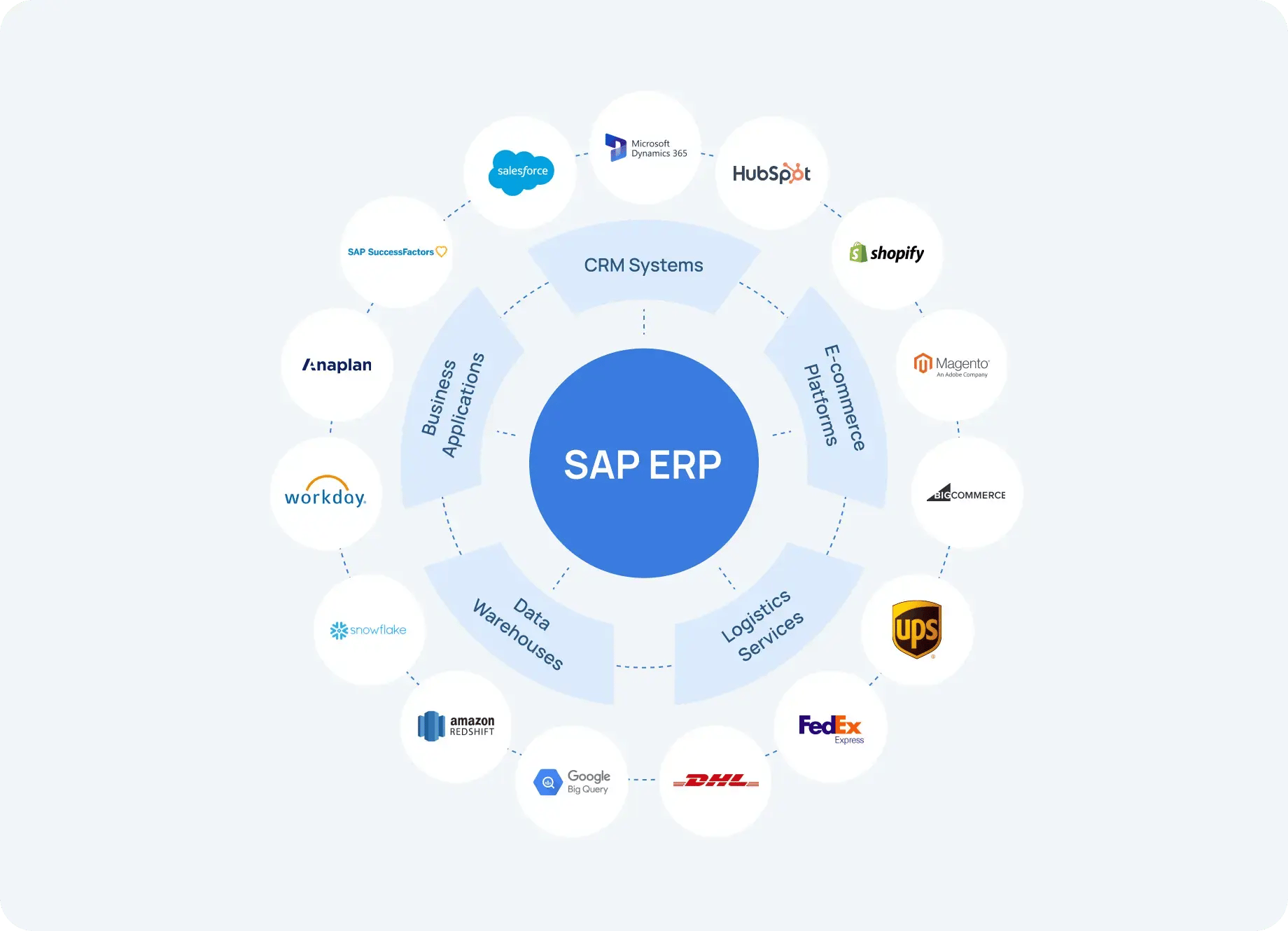
When SAP is not properly integrated with surrounding systems, businesses often experience the following issues:
- Data silos and inconsistencies: In practice, customer, product, or financial data exists in multiple systems, often with conflicting values. Teams lose confidence in the data because no system clearly reflects the latest or correct information.
- Manual exports and re-entries: Teams rely on spreadsheets, CSV files, or copy-and-paste workflows to move data between SAP and other systems, increasing the likelihood of errors and slowing down processes.
- Operational delays: Critical processes (e.g., order fulfillment, invoicing, or inventory updates) are delayed because data does not move automatically between systems.
- Security and governance risks: Manual handling of data often bypasses access controls and audit trails, creating compliance risks and making it difficult to track who accessed or modified sensitive information.
- High maintenance costs: One-off scripts and custom integrations require constant maintenance, frequently breaking during SAP upgrades, system changes, or process adjustments.
SAP ERP integration eliminates these friction points by providing a unified, automated, and governed approach to moving and transforming data across systems.
Typical SAP ERP Integration Scenarios
Synchronizing SAP ERP integration scenarios are driven by the reality that SAP rarely owns an entire business process end to end. While SAP is often the system of record for financials, logistics, and core master data, surrounding systems specialize in customer interaction, execution, or external collaboration. Integration ensures that these systems operate on the same information and participate in shared business workflows.
Below are some of the most common SAP ERP integration scenarios, explained in detail.
SAP ERP and CRM systems
In many organizations, customer-facing activities are managed outside SAP in CRM platforms such as Salesforce or Microsoft Dynamics 365, while SAP remains responsible for order management, pricing, invoicing, and financial accounting.
Integration between SAP ERP and CRM systems typically supports the following flows:
- Customer master data, which is synchronized from SAP to CRM to ensure consistent identifiers, addresses, and account hierarchies.
- Product, pricing, and discount data flowing from SAP into CRM so sales teams provide accurate quotes.
- Sales orders or opportunities created in CRM transferred into SAP for fulfillment, billing, and revenue recognition.
- Order status, delivery updates, and invoice information sent back to CRM to provide visibility to the sales and customer service team.
Without integration, sales teams often operate on outdated or incomplete information, leading to incorrect quotes, delayed order processing, or billing discrepancies. With SAP ERP integration in place, CRM systems become tightly aligned with SAP’s transactional backbone while still remaining flexible and user-friendly for customer-facing roles.
SAP ERP and Supply Chain or Logistics Systems
Supply chain execution frequently relies on specialized systems outside SAP, such as warehouse management systems (WMS), transportation management systems (TMS), or third-party logistics providers.
In these scenarios, SAP ERP integration enables:
- Transfer of purchase orders, delivery instructions, or production outputs from SAP to logistics systems.
- Real-time or near-real-time updates of shipment statuses, goods movements, and inventory levels back into SAP.
- Synchronization of delivery confirmations and tracking information to support financial posting and customer notifications.
A common example is the integration of SAP with third-party warehouses or carriers, where shipment confirmations sent from external logistics systems automatically update inventory and delivery status in SAP. This ensures that physical goods movement and SAP records remain aligned without manual intervention.
Another representative example from within the SAP landscape is integration between SAP S/4HANA and Ariba, where S/4HANA manages core procurement, inventory, and financial processes, while Ariba supports supplier collaboration and network-based procurement. In this case, purchase orders created in SAP S/4HANA are transmitted to suppliers via the Ariba Network; supplier confirmations, shipping notifications, or service confirmations are automatically returned to SAP. These updates trigger corresponding inventory movements and financial postings, ensuring consistent execution across procurement and logistics processes.
Without integration, these supply chain interactions often rely on manual confirmations, emails, or delayed batch updates. This increases the risk of stock inaccuracies, delayed postings, and limited visibility into order and delivery status. With SAP ERP integration in place, supply chain and logistics processes become more automated, transparent, and resilient — even as supplier networks and transaction volumes grow.
SAP ERP and E-commerce platforms
E-commerce platforms are typically responsible for customer interaction, product presentation, and checkout, while SAP manages inventory, pricing logic, order processing, and billing.
Integration between SAP ERP and E-commerce platforms usually includes:
- Product catalogs, pricing rules, and availability data flowing from SAP into the E-commerce system.
- Customer orders captured online and transferred into SAP for fulfillment and invoicing.
- Order status, shipment confirmations, and return information synchronized back to the storefront.
This integration ensures that customers see accurate product availability and pricing while SAP remains the authoritative system for inventory and financial transactions. As order volumes scale, automated integration becomes essential to prevent bottlenecks and maintain a consistent customer experience.
SAP ERP and external financial or compliance systems
Many organizations rely on external systems for tax calculation, billing, payment processing, or regulatory compliance. SAP ERP integration plays a critical role in reliably connecting these systems.
Common integration flows include:
- Sending transaction or invoice data from SAP to external tax engines for real-time tax determination.
- Exchanging payment status, settlement information, or reconciliation data between SAP and financial service providers.
- Transferring compliance-related data to regulatory platforms for reporting or audit purposes.
These integrations help organizations ensure accuracy and compliance without embedding complex external logic directly into SAP, thus reducing system coupling and long-term maintenance complexity.
SAP ERP and data platforms or downstream systems
While SAP executes core transactions, many downstream systems depend on SAP data to function correctly. These may include operational data platforms, automation systems, or partner applications.
Typical scenarios involve:
- Replicating master and transactional data from SAP into downstream systems on a scheduled or event-driven basis.
- Transforming SAP-specific structures into standardized formats suitable for broader consumption.
- Ensuring data quality, consistency, and traceability across systems.
In these cases, the focus is not on analytics within SAP, but on ensuring that accurate, timely data is available wherever it is needed to support automation and business processes.
SAP ERP and partner or ecosystem integrations
Enterprises often exchange data with suppliers, distributors, or service providers that operate outside their internal systems.
SAP ERP integration enables:
- Automated exchange of orders, confirmations, invoices, and shipment notifications
- Standardized data formats for B2B communication
- Reduced manual coordination and faster partner collaboration
These integrations help extend SAP-driven processes beyond organizational boundaries, supporting scalable ecosystem operations.
SAP Integration Patterns: How Systems Talk to Each Other
SAP ERP integration is not defined solely by the technologies or connectors used (please refer to our comprehensive article on SAP connectors for more information on this topic), but by the communication patterns that govern how systems exchange data and coordinate processes. These patterns determine how quickly information flows, how tightly systems are coupled, and how resilient integrations are under load or failure conditions.
Choosing the right integration pattern is critical, especially in complex SAP environments that span on-premise systems, cloud applications, and external partner networks.
Below are the most commonly used SAP integration patterns, along with in-depth explanations and real-world examples.
Synchronous request/response integration
In a synchronous integration pattern, one system sends a request to SAP (or vice versa) and waits for an immediate response before continuing its process. This pattern is typically used when an action cannot proceed without a definitive answer from SAP.
In SAP landscapes, synchronous integrations are often implemented using RFC calls, OData services, or APIs.
Typical use cases include:
- Checking product availability or ATP (Available-to-Promise) in SAP before confirming an order
- Retrieving pricing or discount information from SAP during a sales transaction
- Validating master data in real time (such as customer data or material existence)
Real-world example: An E-commerce platform sends a real-time request to SAP S/4HANA to check inventory availability before allowing a customer to complete checkout. SAP responds immediately with available quantities and delivery dates, ensuring that the order confirmation reflects actual stock levels.
While synchronous integration provides immediate consistency, it also creates tight coupling between systems. If SAP is unavailable or slow to respond, the calling system may experience delays or failures. For this reason, synchronous patterns are best reserved for high-value, low-latency interactions where immediate feedback is essential.
Asynchronous messaging integration
Asynchronous integration decouples systems by allowing messages to be sent without requiring an immediate response. The sending system continues processing, while SAP (or the target system) handles the message independently.
In SAP environments, asynchronous patterns commonly rely on IDocs, message queues, or event messaging mechanisms.
Typical use cases include:
- Transferring sales orders, deliveries, or invoices in high volumes
- Sending shipment confirmations from logistics providers to SAP
- Exchanging procurement documents with supplier networks
Real-world example: A third-party logistics provider sends shipment confirmation messages to SAP as goods leave the warehouse. These messages are processed asynchronously, updating delivery and inventory records in SAP without blocking the logistics system or requiring real-time responses.
Asynchronous integration is more resilient and scalable than synchronous patterns, especially for high-volume or long-running processes. It also provides better fault tolerance, as messages can be retried or queued if SAP is temporarily unavailable.
Event-driven integration
Event-driven integration builds on asynchronous principles, but it introduces business events as the trigger for integration flows. Instead of systems polling for changes or sending data on a fixed schedule, events are emitted when something meaningful happens in SAP or another system.
In modern SAP landscapes, events may be generated from SAP S/4HANA, middleware platforms, or surrounding systems and then distributed to multiple consumers.
Typical use cases include:
- Reacting to order creation, status changes, or goods movements
- Triggering downstream processes when master data is updated
- Notifying external systems of business-critical changes in near real time
Real-world example: When a sales order is created in SAP S/4HANA, an event is published to indicate that a new order exists. Multiple systems subscribe to this event: one updates a customer portal, another triggers logistics planning, and a third initiates compliance checks — all without direct point-to-point dependencies.
Event-driven integration reduces coupling and improves scalability, making it well suited for complex, distributed SAP ecosystems. It also enables greater flexibility, as new consumers can subscribe to events without changing existing integrations.
Batch integration
Batch integration transfers data in groups at scheduled intervals rather than continuously or in real time. This pattern is commonly used when immediate updates are not required or when processing large volumes of data efficiently is a priority.
Batch integrations in SAP environments often use scheduled IDoc processing, file-based exchanges, or controlled data replication jobs.
Typical use cases include:
- Periodic synchronization of master data
- Nightly transfer of financial or inventory records
- High-volume updates that would strain real-time interfaces
Real-world example: At the end of each business day, SAP exports a batch of financial transactions to an external system for reconciliation or downstream processing. The batch is processed overnight, minimizing performance impact during business hours.
While batch integration is cost-effective and predictable, it introduces latency. It is best suited for scenarios where slight delays are acceptable and where data consistency does not need to be instantaneous.
Choosing the right pattern in SAP landscapes
In real SAP environments, multiple integration patterns are often used together. For example, synchronous calls may be used for pricing checks, asynchronous messaging for order processing, and batch jobs for reconciliation or reporting feeds.
The key is to align the integration pattern with business criticality, volume and performance requirements, tolerance for latency, and system availability needs.
A well-designed SAP ERP integration strategy treats these patterns as reusable building blocks, supported by middleware or automated integration platforms that handle orchestration, monitoring, and error handling across all communication types.
Integration Architecture: Beyond Point-to-Point
The integration patterns discussed above describe how systems communicate: synchronously, asynchronously, or through events and batches. The next critical question is how these communication flows are organized at an architectural level across an SAP landscape.
In many organizations, SAP integrations start as isolated point-to-point connections. While this approach may work for a small number of systems, it quickly becomes fragile and difficult to maintain as the number of integrations grows. Enterprise-grade SAP ERP integration requires architectural models that support scalability, governance, and change over time.
Below are the most common integration architectures used in SAP environments, along with practical examples of how they are applied.
Point-to-point architecture
In a point-to-point architecture, SAP connects directly to each external system with a dedicated interface. Each integration is designed and implemented independently, often using custom logic or scripts.
Typical SAP scenario: SAP ECC or SAP S/4HANA is directly connected to a CRM system, a warehouse system, and an E-commerce platform — each with its own interface logic and data mappings.
Why organizations start here:
- Fast initial implementation
- Minimal upfront architectural planning
- Works for a small number of systems
Where it fails:
- Every new system multiplies integration complexity.
- Changes in SAP data structures require updates across multiple interfaces.
- Monitoring and error handling are fragmented.
- Technical debt grows rapidly.
In real SAP landscapes, point-to-point architectures often become brittle during system upgrades, S/4HANA migrations, or cloud adoption initiatives. This is why most organizations eventually move toward more centralized and standardized architectures.
Hub-and-spoke architecture
In a hub-and-spoke architecture, SAP and all other systems connect to a central integration hub rather than directly to each other. The hub manages message routing, transformation, and orchestration.
Typical SAP scenario: SAP S/4HANA sends and receives all integration traffic through a central integration layer, which then connects to CRM, logistics, procurement networks, and external partners.
Key characteristics:
- Centralized transformation and routing logic
- Simplified monitoring and governance
- Reduced duplication of integration logic
Real-world example: An enterprise uses a central platform to manage SAP integrations with Salesforce, SAP Ariba, third-party logistics providers, and finance systems. Changes to SAP data structures are handled once in the hub instead of in every downstream interface.
Hub-and-spoke architectures significantly reduce complexity, compared with point-to-point designs. However, they can become bottlenecks, if they are not designed for scale or if too much logic is centralized without clear separation of responsibilities.
API-led integration architecture
API-led integration is structured around well-defined APIs that expose SAP functionality and data in a controlled, reusable way. Rather than building custom interfaces for each consumer, SAP capabilities are surfaced as services.
Typical SAP scenario: SAP S/4HANA exposes APIs for customer data, order creation, pricing, and inventory checks. Multiple systems (e.g., CRM, E-commerce platforms, partner applications) consume these APIs.
Key characteristics:
- Clear contracts between SAP and consuming systems
- Reusable integration assets
- Improved security and governance
Real-world example: A global enterprise exposes SAP order creation and pricing APIs. Both its internal CRM and external partner portals use the same APIs, ensuring consistent business logic while avoiding duplicated integrations.
API-led architectures are particularly valuable in hybrid and cloud-centric SAP environments, where new consumers need to be onboarded quickly without modifying core ERP processes.
Event-driven integration architecture
Event-driven architectures organize integrations around business events rather than direct requests or scheduled data transfers. SAP or surrounding systems publish events when meaningful changes occur, and interested systems subscribe to those events.
Typical SAP scenario: SAP S/4HANA emits events when sales orders are created, deliveries are posted, or master data is updated. Multiple downstream systems react independently.
Key characteristics:
- Loose coupling between systems
- High scalability and flexibility
- Natural support for real-time and near real-time processes
Real-world example: When a goods movement is posted in SAP, an event triggers updates in inventory systems, customer portals, and logistics planning tools — without SAP needing to know which systems consume the event.
Event-driven architectures are especially powerful in complex SAP ecosystems where multiple systems need to react to the same business change without introducing tight dependencies.
Hybrid architectures in real SAP landscapes
In practice, most enterprises use a combination of architectural styles. For example:
- API-led integration for customer and order processes
- Asynchronous messaging for logistics and procurement
- Event-driven flows for real-time updates
- Batch integration for high-volume or non-critical data
The role of integration architecture is not to enforce a single model, but to provide structure and governance so that these approaches coexist without creating chaos.
Why architecture matters for long-term SAP ERP integration
A well-designed integration architecture:
- Reduces long-term maintenance costs
- Simplifies SAP upgrades and S/4HANA migrations
- Improves visibility and operational reliability
- Enables faster onboarding of new systems and partners
Rather than treating integrations as isolated technical tasks, successful organizations design SAP ERP integration as a strategic architectural capability that evolves alongside the business.
Key Challenges in SAP ERP Integration
Integrating SAP ERP into a broader enterprise landscape is rarely straightforward. SAP systems are designed to support complex, mission-critical business processes, and their integration must account for high data volumes, strict consistency requirements, and evolving technical landscapes. As organizations modernize, adopt cloud platforms, and expand their digital ecosystems, these challenges become more pronounced and more difficult to manage with ad-hoc approaches.
Below are the most common challenges encountered in SAP ERP integration:
- Complex SAP data models and semantics: SAP data structures are deeply interconnected and often highly normalized, with business meaning distributed across multiple tables and objects. Materials, customers, suppliers, and financial documents may have dependencies that are not immediately visible to non-SAP systems. Integration efforts frequently struggle when SAP-specific concepts are flattened or misinterpreted during data exchange, leading to incomplete or inconsistent downstream data.
- Heterogeneous system landscapes: SAP ERP rarely integrates with a single type of system. Enterprises must connect SAP to cloud applications, legacy platforms, partner networks, and industry-specific solutions, each with its own data models, protocols, and reliability characteristics. Managing consistent integration behavior across such a diverse landscape requires careful design and centralized governance.
- Data quality and consistency risks: Integration amplifies data quality issues. Errors, duplicates, or missing values originating in SAP or external systems propagate quickly across the ecosystem, if they are not detected and handled early. Without validation, reconciliation, and monitoring mechanisms, organizations often discover inconsistencies only after they impact financial reporting, customer experience, or regulatory compliance.
- Performance and scalability constraints: SAP systems often process large transaction volumes, particularly in logistics, procurement, and finance. Integrations that are not designed for scale can become performance bottlenecks, causing delays in order processing or inventory updates. Poorly optimized synchronous calls or unbalanced batch jobs are common sources of system strain.
- Security, access control, and compliance requirements: SAP ERP integrations frequently handle sensitive information, including financial, customer, and supplier data. Ensuring secure authentication, encrypted communication, role-based access, and auditability across all integration points is essential. Manual workarounds or poorly governed interfaces increase exposure to compliance and data protection risks.
- Operational visibility and error handling: When integrations fail, the impact is often immediate and business-critical. However, many SAP environments lack end-to-end visibility across integration flows, making it difficult to identify where failures occurred or how to resolve them. Without centralized monitoring and clear error-handling procedures, integration issues can persist unnoticed or require costly manual investigation.
- Change management and long-term maintenance: SAP landscapes evolve continuously through upgrades, enhancement packs, cloud migrations, and process changes. Integrations built as tightly coupled, one-off solutions often break during these transitions. Maintaining integration stability over time requires designs that absorb change rather than amplify it.
Taken individually, each of these challenges can slow down integration initiatives. Taken together, they explain why SAP ERP integration cannot be treated as a series of isolated technical tasks. Sustainable integration requires architectural discipline, standardized patterns, and automation that supports monitoring, governance, and change management at scale.
Organizations that proactively address these challenges are better positioned to integrate SAP ERP reliably across their digital ecosystems, while remaining flexible enough to adapt as business and technology requirements evolve.
Best Practices for Successful SAP ERP Integration
Successful SAP ERP integration is rarely the result of a single tool or technology choice. Instead, it emerges from a set of disciplined practices that address data complexity, system diversity, operational reliability, and long-term change. Organizations that apply these practices consistently are better able to scale integrations, reduce operational risk, and adapt to evolving SAP landscapes.
The following best practices reflect lessons learned from real enterprise SAP integration programs.
Design integrations around business processes, not just data
SAP ERP integration should start with a clear understanding of end-to-end business processes rather than isolated data exchanges. Focusing only on tables, fields, or message formats often leads to integrations that technically work but fail to support real operational needs.
Best practice is to:
- Identify which business events or process steps require integration.
- Define ownership and system-of-record responsibilities.
- Align integration logic with how the business actually operates.
This approach ensures that integrations support outcomes such as order fulfillment, procurement execution, or financial posting — not just data movement.
Standardize data models and integration contracts
Given SAP’s complex data structures, standardization is critical. Defining canonical data models or clearly documented integration contracts helps prevent misunderstandings between SAP and external systems.
Effective practices include:
- Using consistent identifiers across systems
- Documenting field-level mappings and transformation rules
- Avoiding system-specific assumptions in downstream consumers
Standardization reduces rework, simplifies onboarding of new systems, and improves long-term maintainability.
Choose integration patterns deliberately
As discussed earlier, SAP environments typically use a mix of synchronous, asynchronous, event-driven, and batch integrations. Best practice is to select patterns intentionally based on business and technical requirements.
For example:
- Use synchronous calls only when immediate feedback is essential.
- Favor asynchronous or event-driven patterns for high-volume or loosely coupled processes.
- Use batch integration for non-time-critical, high-volume data.
This deliberate approach improves resilience and prevents performance bottlenecks.
Minimize custom logic inside SAP
SAP Clean Core strategy emphasizes keeping the ERP system as close as possible to standard functionality, limiting custom code that directly modifies or tightly couples to the SAP core. This principle is especially important for SAP ERP integration, where excessive customization can significantly increase upgrade risk and long-term maintenance costs.
In practice, embedding complex integration logic — such as orchestration, data transformation, or cross-system business rules — directly into SAP often leads to tightly coupled interfaces that are difficult to adapt during system upgrades or SAP S/4HANA transitions. These custom implementations can conflict with Clean Core goals and slow down innovation.
A Clean Core–aligned integration approach typically means:
- Using SAP standard interfaces and extension points rather than modifying core objects.
- Keeping SAP focused on core transactional and business logic.
- Externalizing integration orchestration, routing, and transformation logic.
- Designing integrations that remain stable even as SAP is upgraded or extended.
By minimizing custom logic inside SAP and adhering to Clean Core principles, organizations reduce technical debt, simplify upgrades, and create a more flexible foundation for future integration and modernization initiatives.
Build in data quality checks and validation early
Data quality issues rarely originate in integration layers, but integration is where their impact becomes visible. Best practice is to validate data as close to the source as possible and to consistently enforce quality checks across flows.
Key measures include:
- Schema validation and mandatory field checks
- Business rule validation (e.g., allowable values, relationships)
- Controlled handling of exceptions and rejected records
Proactive validation prevents bad data from propagating across systems.
Ensure end-to-end monitoring and operational visibility
Operational visibility is essential for maintaining trust in SAP ERP integrations. Teams need to know whether a message was sent and if it was successfully processed, resulting in the expected business outcome.
Best practices include:
- Centralized monitoring across all integration flows
- Clear error categorization and escalation paths
- Audit trails that support troubleshooting and compliance
Visibility turns integration from a black box into a manageable operational capability.
Design for change and evolution
SAP environments are constantly evolving through system upgrades, new business requirements, and expanding ecosystems. Integrations must be designed to absorb change, not break under it.
To support this:
- Avoid tight coupling between systems.
- Use versioned interfaces and backward-compatible changes.
- Clearly document assumptions and dependencies.
Designing for change reduces the cost and risk of future transformation initiatives.
Treat SAP ERP integration as a strategic capability
Finally, the most successful organizations recognize SAP ERP integration as a strategic enterprise capability, not a collection of one-off projects. This means investing in governance, shared standards, and reusable integration assets.
When integration is treated strategically, organizations gain:
- Faster onboarding of new systems and partners
- Lower operational and maintenance costs
- Greater resilience during SAP migrations and modernization efforts
Taken together, these best practices address the core challenges of SAP ERP integration: complexity, scale, reliability, and change. They provide a foundation for building integrations that support today’s needs, while remaining adaptable to future business and technology evolution.
Choosing the Right Tools for SAP ERP Integration
Selecting the right tools for SAP ERP integration is not simply a technical decision; it is an architectural and operational one. The tools an organization chooses will determine how easily integrations can be built, governed, scaled, and adapted as SAP landscapes evolve.
In practice, enterprises use a mix of approaches, each with distinct strengths and trade-offs. Understanding these options helps clarify where automated integration platforms such as DataLark add the most value.
SAP native integration tools
SAP provides a range of native integration capabilities on SAP BTP, including SAP Integration Suite, SAP Cloud Connector, and SAP-managed services. These tools are tightly aligned with SAP’s product roadmap and support standard SAP interfaces and extension models.
Key advantages include:
- Deep alignment with SAP standards and lifecycle management
- Strong support for SAP-to-SAP scenarios
- Built-in support for SAP security and identity models
Limitations to consider:
- Often requires strong SAP-specific expertise.
- Can be complex to configure and operate for non-SAP systems.
- May become less flexible in heterogeneous, multi-vendor environments.
SAP-native tools are a solid choice when SAP is the dominant system and integration scope remains largely within the SAP ecosystem.
Enterprise middleware and ESB platforms
Traditional enterprise service buses (ESBs) and middleware platforms have long been used to integrate SAP with a wide range of systems. These platforms excel at protocol mediation and centralized orchestration.
Key advantages include:
- Mature capabilities for routing, transformation, and orchestration.
- Suitable for large, centralized integration teams.
- Proven reliability in traditional SOA environments.
Limitations to consider:
- Heavyweight architectures with long implementation cycles.
- High operational overhead and maintenance effort.
- Slower adaptation to cloud-native and event-driven patterns.
While still relevant in some enterprises, ESBs are often less aligned with modern integration needs that prioritize agility, automation, and rapid change.
Custom-built integrations
Some organizations choose to build integrations using custom code, scripts, or lightweight frameworks. This approach is often driven by short-term needs or perceived flexibility.
Where they work best:
- Very specific, isolated use cases
- Small-scale or temporary integrations
Limitations to consider:
- High long-term maintenance costs
- Fragile during SAP upgrades or S/4HANA migrations
- Poor visibility, governance, and error handling
- Direct conflict with SAP Clean Core principles
Custom integrations frequently become technical debt as landscapes grow and change.
Automated integration platforms
Automated integration platforms address the limitations of the approaches above by providing a governed, reusable, and automation-first integration layer between SAP ERP and surrounding systems.
Rather than focusing only on connectivity, these platforms emphasize end-to-end integration lifecycle management — from design and deployment to monitoring and evolution.
Automated integration platforms are particularly effective when organizations need to:
- Integrate SAP with multiple non-SAP systems.
- Support both real-time and batch integration patterns.
- Enforce consistent data handling and validation.
- Reduce reliance on custom SAP code.
- Scale integrations without increasing operational complexity.
They align naturally with SAP Clean Core by keeping orchestration and transformation logic outside the ERP system. DataLark is a perfect example of such a platform.
The advantages DataLark brings to SAP ERP integration
DataLark is designed to support enterprise-scale SAP ERP integration with a strong focus on automation, data consistency, and operational reliability.
Key advantages include:
- Automation-first integration design: DataLark enables teams to automate data flows and integration logic rather than embedding it in custom code. This reduces manual effort and ensures repeatable, predictable behavior across integrations.
- Support for complex SAP data structures: SAP data models are inherently complex. DataLark is built to handle schema mapping, transformation, and alignment in a controlled way, helping to ensure that SAP data remains consistent and usable across systems.
- Clean Core-aligned architecture: By externalizing integration logic from SAP, DataLark supports SAP Clean Core strategy. SAP remains focused on core transactional processing, while integration logic evolves independently.
- Unified handling of real-time and batch scenarios: Many SAP environments require both near-real-time integrations (e.g., order or inventory updates) and scheduled batch processes. DataLark supports both within a single, governed framework.
- Built-in data quality and validation capabilities: Instead of treating data quality as an afterthought, DataLark enables validation and consistency checks as part of the integration flow, reducing the risk of bad data propagating across systems.
- Operational visibility and control: Centralized monitoring, error handling, and traceability give teams insight into what is happening across SAP integrations, thus making issues easier to detect, diagnose, and resolve.
- Scalability across heterogeneous landscapes: DataLark is well suited for environments where SAP must integrate with cloud applications, partner systems, and evolving digital platforms — not just other SAP systems.
Putting tool choices into perspective
In reality, most enterprises use a combination of tools. SAP-native solutions may handle SAP-to-SAP integration, while automated integration platforms like DataLark address cross-system, data-intensive, and rapidly evolving scenarios.
The key is to choose tools that:
- Align with architectural principles
- Reduce long-term complexity
- Support SAP Clean Core and modernization initiatives
- Enable automation, governance, and scalability
When evaluated through this lens, automated integration platforms become a strategic enabler for sustainable SAP ERP integration — not just another integration option.
Conclusion
SAP ERP integration is not simply about connecting systems; it is about enabling reliable, scalable business processes across an increasingly complex enterprise landscape. As organizations adopt SAP S/4HANA, align with SAP Clean Core principles, and expand their digital ecosystems, integration becomes a foundational capability rather than a supporting task.
Successful SAP ERP integration requires:
- Thoughtful selection of integration patterns
- Architectures that scale beyond point-to-point connections
- Governance that ensures consistency, security, and operational visibility
- Tooling that supports automation without introducing technical debt.
Organizations that approach integration strategically are better positioned to reduce operational risk, accelerate change, and support long-term SAP modernization. By externalizing integration logic, standardizing data flows, and embedding data quality into integration processes, enterprises can keep SAP focused on core business execution while remaining flexible and future-ready.
DataLark helps organizations achieve this by automating SAP ERP integration across complex, multi-system environments. With support for scalable integration patterns, built-in data validation, and Clean Core–aligned architecture, DataLark enables teams to reliably connect SAP with surrounding systems and evolve integrations as business requirements change.
If you’re planning to modernize your SAP integrations or struggling with fragmented, hard-to-maintain interfaces, explore how DataLark can support your SAP ERP integration strategy.